Voxel Arcade Hub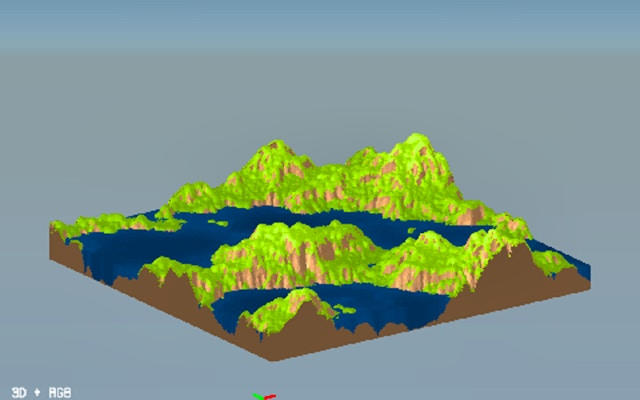
PLAY NOW
About this game
Master the Art of Digital World-Building
Welcome to 3D Terrain Generator, your ultimate digital toolkit for crafting breathtaking and realistic 3D landscapes. Whether you're a game developer prototyping new worlds, a digital artist creating immersive environments, or a hobbyist exploring procedural generation, this tool provides a powerful and intuitive suite of features to bring your terrain visions to life. Start from scratch with algorithmic generation or build upon your own imported maps for complete creative control.
Core Features & Powerful Capabilities
The 3D Terrain Generator is packed with professional-grade features designed for flexibility and high-quality output.
- Dual Creation Methods: Generate infinite, natural-looking terrain using sophisticated Perlin noise algorithms or import your own 8-bit grayscale heightmaps for precise customization.
- Advanced Terrain Sculpting: Apply realistic erosion simulations to add weathering, river valleys, and geological authenticity to your landscapes. Adjust parameters like [FAC] (factor), [TU] (terrain units), and [PERCENT] to fine-tune the effect.
- Visual Customization: Paint your terrain with ease using intuitive texture application tools. Define colors with [RGB] values and control application areas using [PX] (pixel) and [NUM] (number) based inputs.
- Flexible Export Options: Seamlessly export your finished terrain in a variety of formats, including standard 3D mesh files like .obj, ready for use in game engines, 3D modeling software, and rendering applications.
- User-Friendly Interface: Every input is clearly labeled with helpful tooltips (e.g., [ANGLE] for rotations, [PERCENT] for ratios), making complex parameters easy to understand and manipulate, even for beginners.
How to Use the Terrain Generator
Getting started is straightforward. First, choose your creation path: click 'Generate' for a new Perlin noise terrain or 'Import' to load your heightmap. Use the terrain editor to adjust base height and scale, measured in [TU]. Next, navigate to the Erosion panel to simulate natural forces; control intensity with [FAC] multipliers and direction with [ANGLE] settings. Then, move to the Texturing section to apply colors and materials, using [RGB] selectors and [PERCENT] sliders for blend strength. Finally, preview your masterpiece and use the Export function to save it as a 3D mesh (.obj) or image for your project. The intuitive workflow empowers you to iterate quickly from concept to final asset.
Your Gateway to Professional 3D Environments
The 3D Terrain Generator - Procedural Landscape Creator bridges the gap casual gameween complex simulation software and accessible creative tools. It demystifies the process of professional terrain modeling, offering a robust platform where creativity meets technical precision. By combining procedural generation, dynamic simulation, and versatile export, it serves as an indispensable asset for anyone involved in 3D content creation. Start building the worlds of your imagination today, and export ready-to-use assets that elevate your game, film, or visualization project to the next level.